# Select ML Model

Depending on your choice of "Single Table" or "Multiple Tables" when creating the project, you will have different models (Synthesizers) available to choose from.

**Single-table** synthesizers include GaussianCopula, CTGAN, TVAE, and CopulaGAN (all based on models from [Synthetic Data Vault](https://sdv.dev/SDV/user_guides/single_table/models.html)).  In the future, this may include other models like those specific to certain industries.

**Single-Table Synthesizer Selection:**  These options vary in speed and data quality. We recommend starting with the "GaussianCopula" model (fastest but least accurate) for single table before moving onto one of the others to improve accuracy of results.

<figure><img src="/files/dZiz62xFzWeT7jQr40kq" alt=""><figcaption><p>Single-table synthesizer details.  CTGAN and TVAE deliver accurate results for a single table</p></figcaption></figure>

**Multi-table** synthesizers currently only include the DataMynd Premium Synthesizer (DmSynthMT1).  The DataMynd synthesizer is built to optimize performance and accuracy running on Snowflake. &#x20;

Note: DmSynthMT1 is only available after selecting multiple tables, but it can be used for a single table as well (just add a single table).

**Advanced Parameters:**

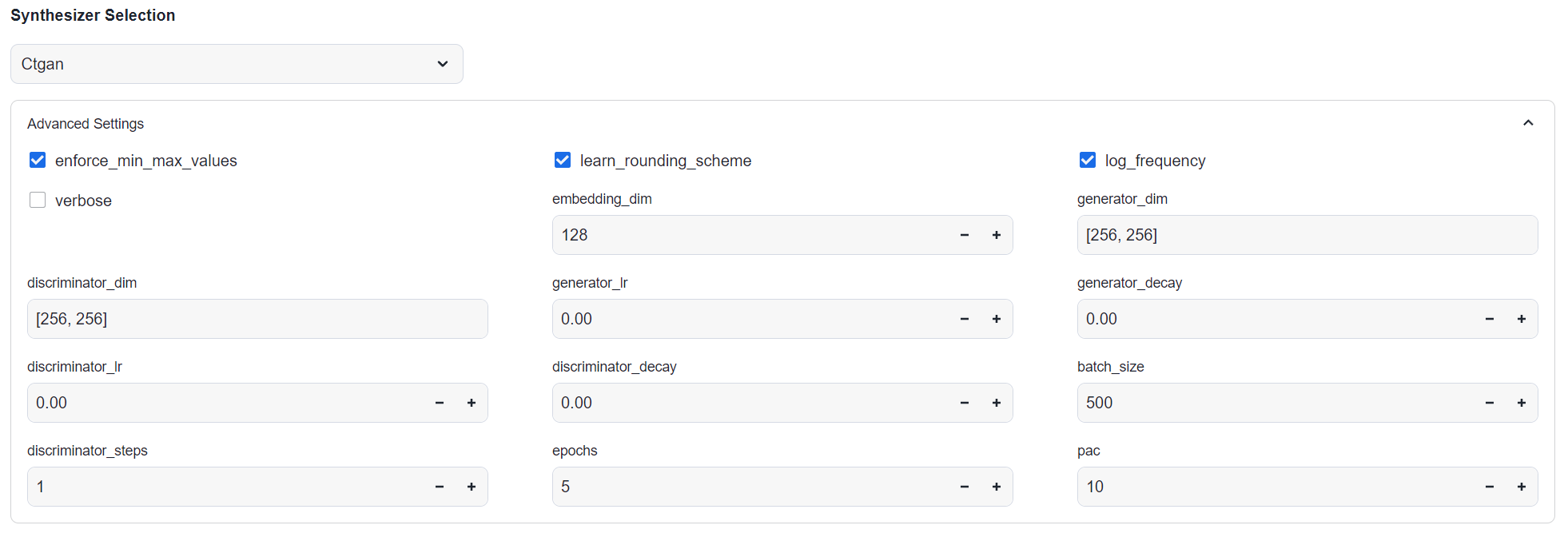
1. Here you will also be able to select optional parameters for the selected model. The defaults are recommended for most users (especially when starting out), and should be adjusted with caution.
2. If using a neural-net based model, you will see an 'Epochs' parameter. We recommend starting with a low number (e.g. 5) and increasing once you've validated the model is working as expected.

<mark style="color:red;">**Warning**</mark>: Most of these parameters' default settings will work for most starting scenarios.  Changing these can cause errors.  We recommend only changing these after you have a good familiarity for using the app.

<figure><img src="/files/tgQ2zyY1GOUwC9uchTyT" alt=""><figcaption><p>See SDV documentation (eg. <a href="https://sdv.dev/SDV/user_guides/single_table/ctgan.html#how-to-modify-the-ctgan-hyperparameters">CTGAN parameters</a>) for details  on single table parameters.</p></figcaption></figure>

**DmSynthMt1 Parameters:**

* epochs: Number of training epochs.  Raise this for more accurate results.  We recommend starting with a low number (\~5) while determining initial fit.
* batch\_size: Number of records (root table) per training batch.  Raise this number to improve performance.  <mark style="color:red;">**Warning**</mark>: too high a number may cause training errors.
* optimize\_batch\_size: Runs an optimization step at the start of the training process.  10-15 minute overhead.  Useful for large or complex datasets, or when epochs is high.
* compile: Enables model to run much more efficiently.  5-10 minute overhead.  Useful for large or complex datasets, or where epochs is high.

<figure><img src="/files/0b3L9J65wLK3T74g14wZ" alt=""><figcaption></figcaption></figure>


---

# Agent Instructions: Querying This Documentation

If you need additional information that is not directly available in this page, you can query the documentation dynamically by asking a question.

Perform an HTTP GET request on the current page URL with the `ask` query parameter:

```
GET https://docs.datamynd.ai/application-workflow/select-ml-model.md?ask=<question>
```

The question should be specific, self-contained, and written in natural language.
The response will contain a direct answer to the question and relevant excerpts and sources from the documentation.

Use this mechanism when the answer is not explicitly present in the current page, you need clarification or additional context, or you want to retrieve related documentation sections.